

Deploy from Claude Desktop
Add VibeHost as a custom connector in Claude Desktop and give your Claude artifacts a permanent URL you can share, from the chat and without a terminal.
You built something in Claude, maybe a dashboard or a report, and someone asks for a link.
Claude's own Publish button creates a public claude.ai/public/artifacts/… URL that anyone can open. If that's fine, you're done. To give them a permanent URL on your own subdomain, with privacy settings you control, connect VibeHost.
You set it up once in Claude Desktop. After that, you ask Claude to deploy from any chat.
Connect VibeHost to Claude Desktop
On a Team or Enterprise plan?
Only an Owner can add custom connectors. The Owner adds VibeHost once under Organization settings → Connectors → Add → Custom → Web, with the URL https://api.vibehost.com/mcp. Members then open Customize → Connectors, find VibeHost, and click Connect (step 4).
1. Open Connectors
Open Claude Desktop. Click your profile icon → Customize → Connectors.
You'll see the Connectors panel with any existing integrations (e.g. GitHub).
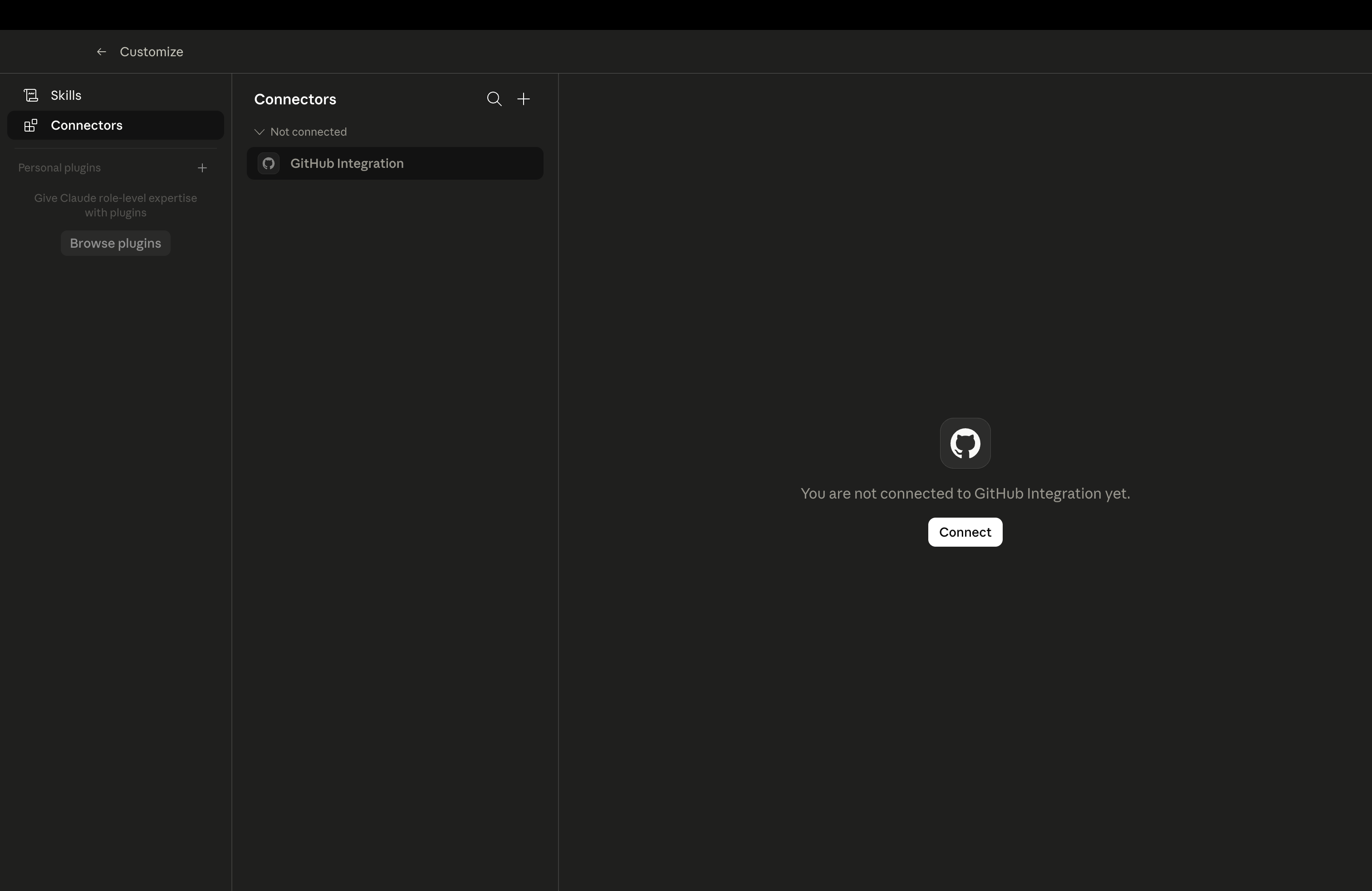
2. Add a custom connector
Click the + button in the top-right corner of the Connectors panel. Select Add custom connector from the dropdown.
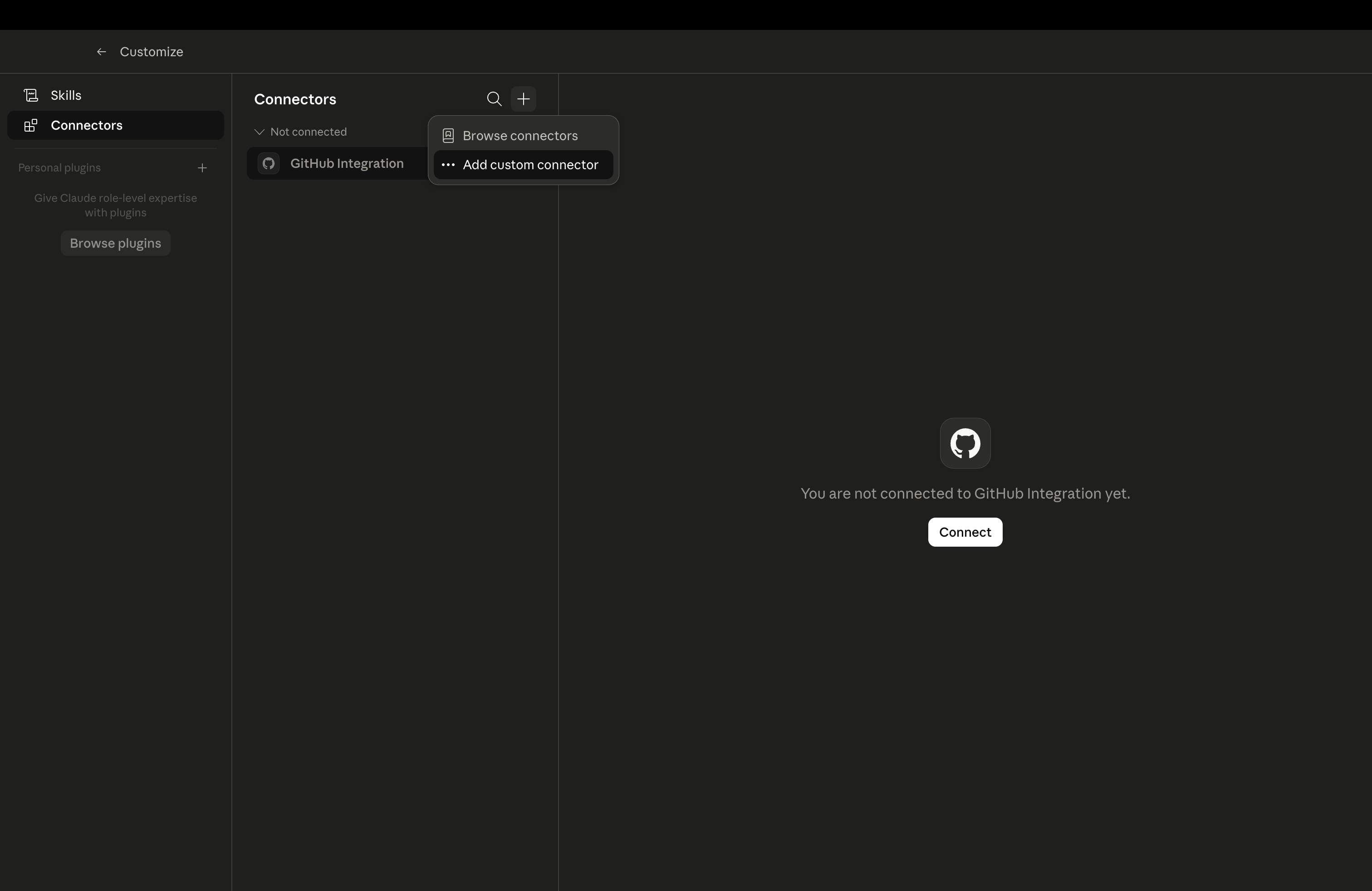
3. Enter VibeHost details
In the dialog, fill in:
- Name:
VibeHost - Remote MCP server URL:
https://api.vibehost.com/mcp
Leave Advanced settings as-is. Click Add.
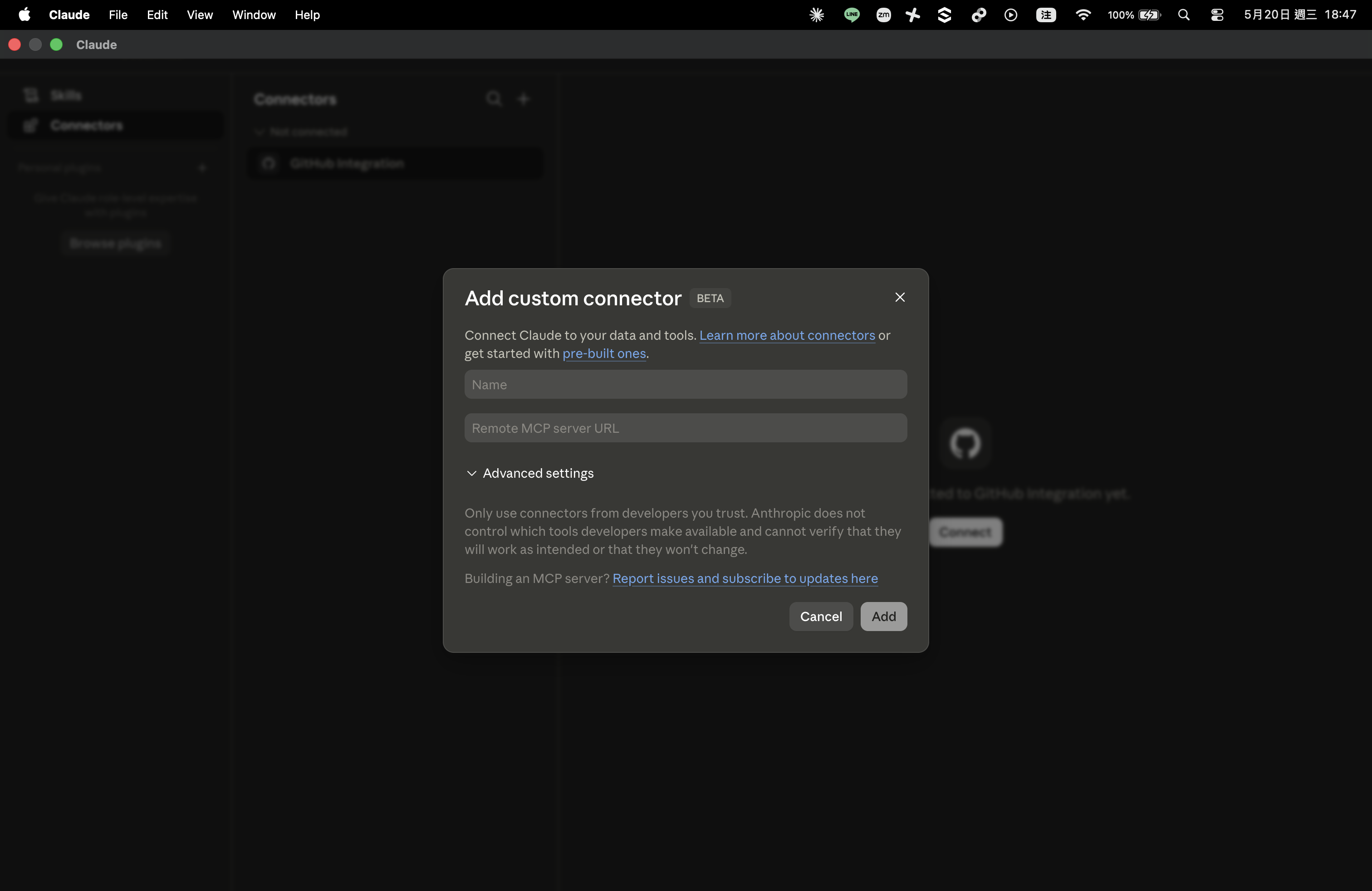
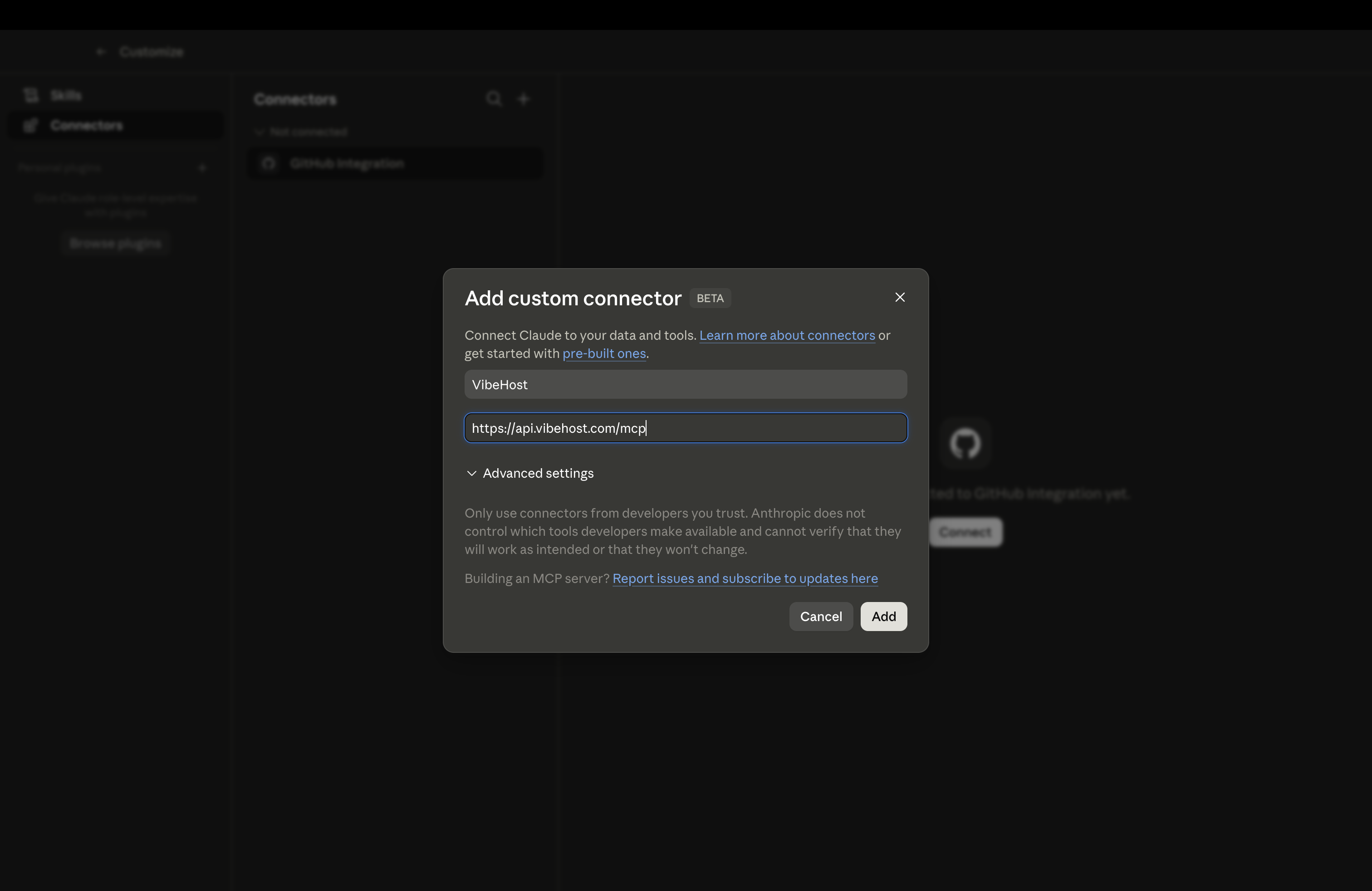
4. Authorize
VibeHost now appears in your Connectors list with a CUSTOM badge. Click Connect. Your browser opens for a one-time OAuth sign-in (Google or email, same as vibehost.com).
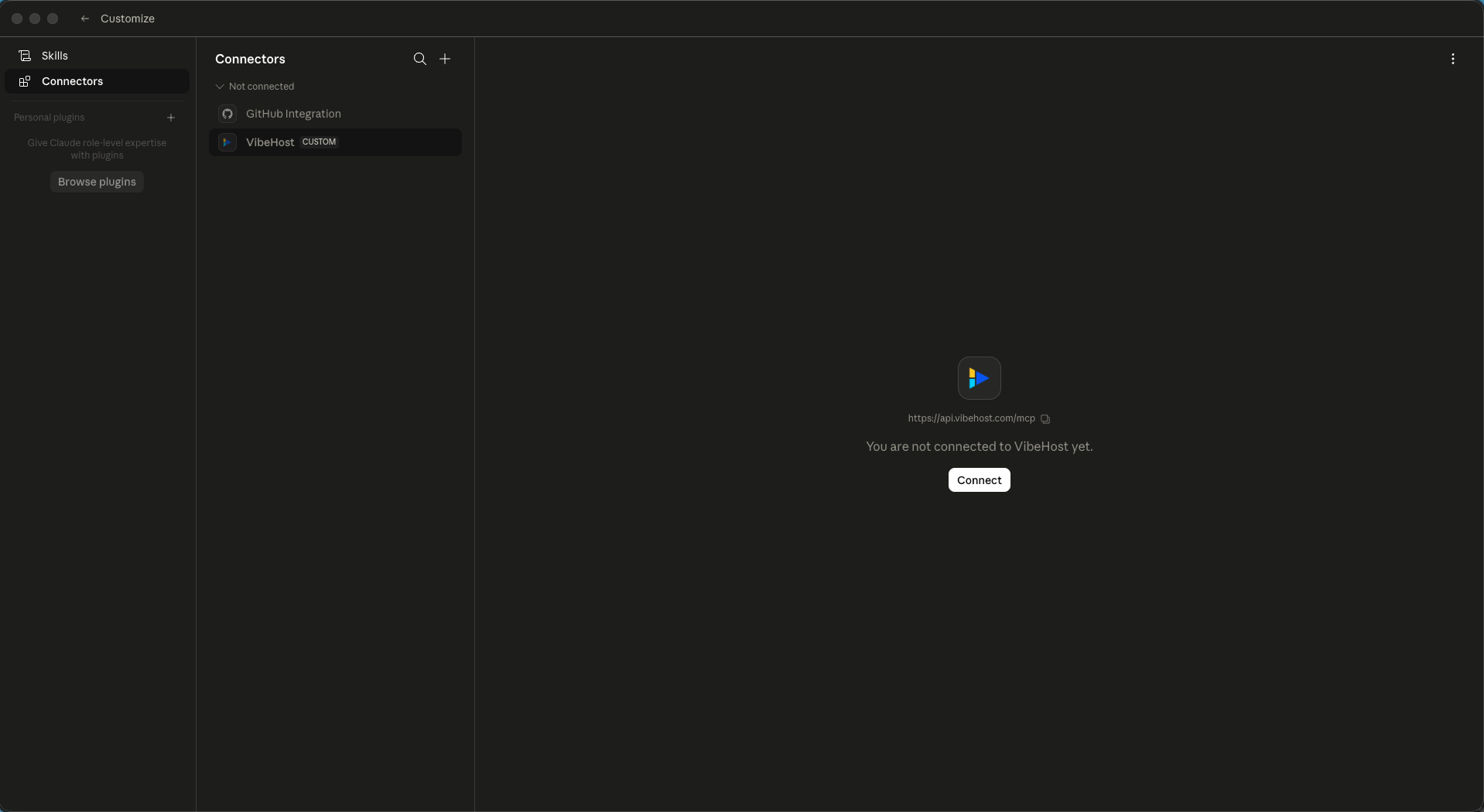
Once authorized, Claude Desktop can deploy to VibeHost. The connection persists across sessions, so you only do this once.
Deploy an artifact
With VibeHost connected, tell Claude what you want:
Deploy this to VibeHost.
Or be more specific:
Deploy this dashboard to VibeHost as an app called "q2-metrics". Make it public.
Claude creates the app, writes the artifact into it and deploys it behind the scenes (the tool calls are described once, in Choosing an upload path), then returns a live URL like https://q2-metrics-yourworkspace.vibehost.space.
The artifact renders as it does in the Claude preview, with its interactive elements, charts, and animations. Anything that needs a backend (API calls to localhost, database connections) won't work, since VibeHost serves static files.
What you can do from chat
Once connected, you can ask Claude to:
| Say this | What happens |
|---|---|
| "Deploy this to VibeHost" | Creates an app + deploys the current artifact |
| "Update the deploy" | Pushes a new version to the same URL |
| "Make it public" / "Make it private" | Changes visibility |
| "Roll back to the previous version" | Reverts to the last deployment |
| "Share this with sarah@acme.com" | Adds a viewer grant by email |
| "Give me a share link that expires in 7 days" | Creates a time-bound access link |
| "Delete the app" | Removes the app and all deployments |
Whether Claude asks before it deletes an app, changes who can see it, or does anything else is up to your connector's permission settings in Claude. VibeHost also instructs Claude not to make an app public unless you ask for it directly.
When to use this vs. the Chrome extension
| Claude Desktop + MCP | Chrome extension | |
|---|---|---|
| How | Talk to Claude in chat | Click a button on the artifact |
| Best for | Iterating on deploys ("make it public, now roll back, now share with Sarah") | Quick one-off deploys from any AI canvas |
| Works with | Claude Desktop only | Claude, ChatGPT, Gemini, AI Studio, v0 |
| Access control | Full (grants, share links, passwords, visibility) | Basic (private by default, change via CLI/dashboard) |
Both deploy to the same VibeHost backend. A deploy started from the extension can be updated from chat, and vice versa.
Troubleshooting
"Some MCP servers couldn't be loaded … vibehost"
VibeHost was added to claude_desktop_config.json with a url. That file only accepts local servers launched by a command, so Claude Desktop skips the entry. Remove the vibehost entry from the file (Settings → Developer → Edit Config), restart Claude Desktop, and add VibeHost as a custom connector instead (steps above).
"You are not connected to VibeHost yet"
Click the Connect button in Connectors → VibeHost. Complete the OAuth flow in your browser.
Claude says it can't find VibeHost tools
Close and reopen Claude Desktop. Check that VibeHost appears in Connectors with status "Connected" (not "Not connected").
Deploy fails with "UNAUTHENTICATED"
Your OAuth token may have expired. Go to Connectors → VibeHost → click the three-dot menu → Reconnect.
Artifact deploys but doesn't render correctly
VibeHost serves static files. If your artifact fetches from localhost or calls a backend API, those calls will fail once deployed. Keep artifacts self-contained.
See also
- MCP server lists every tool and explains OAuth.
- The Chrome extension adds a deploy button to Claude Artifacts in the browser.
- Grants and visibility explains the access control model.
- Share links give time-bound access without sign-up.
Personal access tokens
Long-lived bearer tokens for CI and external integrations, limited by scope, by app and by workspace.
Deploy from Gemini Spark
Add VibeHost as a custom app in Gemini's Connected Apps and give what you build with Gemini a permanent URL you control, from the chat and without a terminal.